Showing posts with label photoshop. Show all posts

Friday, February 4, 2011

photoshop filters!

since i've been spending lots of time in photoshop, i thought i would share some of my assignments with you. this last assignment involved creating a visitors guide cover for my hometown. i created one for alaska, since most of my pictures weren't specific to anchorage.

after choosing a number of photos, i had to edit them - adjust brightness, sharpen certain areas, smooth other areas, etc - then apply appropriate artistic filters that would showcase the images without going over the top.

bear pic - i wanted it to have a painting type look to it, but still keeping the detail.

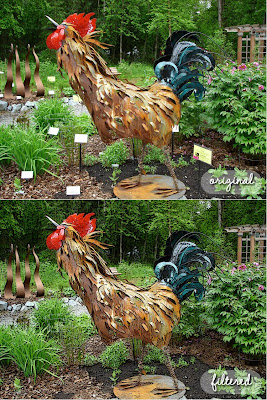
rooster pic - i accentuated the edges and made the colors a tad more vibrant, in addition to removing the little signs.
trout pic - i used the cutout filter - which i really love - but toned it down to still show off the color & spots on the trout.
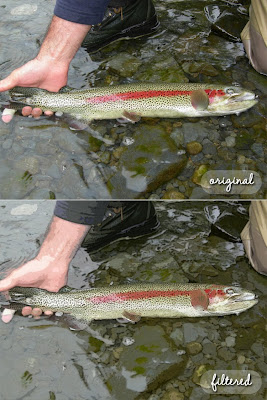
click on the link below the picture (or open in a new tab), then click to zoom in to see a larger version - i couldn't get blogger to upload a larger pic.

what do you think?

Thursday, January 27, 2011

lost pups

i was on my way back to work after lunch and as i was driving, i saw a couple of dogs trotting along the road. they looked like they were having fun, stopping here & there to sniff stuff. and there was no owner in sight.


since we are owners of two very loved dogs and would be horrified if they went missing, i made the decision to turn around & park on a side street. i got out of my car, wished that i had dog treats with me, and knelt down to say hi to the pups headed my direction. they ran right up to me and gave me a very happy, friendly greeting! they looked well fed & had collars with tags, quite obviously someone's pets.


i called (and called and called) the numbers on their tags, and decided to put them in the car so they wouldn't run out into traffic. after a few minutes, the owner called. apparently the dynamic duo had dug a hole under the fence & snuck out of the yard. their owner gave me directions to the house & i drove them home.


i didn't manage to snap a pic of both dogs, but i did get this one (with a little photoshop improvements):


i believe her name is abby & she is an 11 month old silver lab. she was so sweet. yay for happy endings!

Saturday, January 22, 2011

photoshop practice with vito

here's another photoshop attempt.

the original (phone picture):

the edited version:

on the edit, i tried to adjust the exposure & take out some of the yellow lighting. i also cleaned up the carpet (i wish cleaning carpet was that easy). i selected vito and brightened him up separately from the background. again the pic quality was poor...i wonder how i would fix that graininess, if it's even possible.

vito lays like this all the time. he's such a goof.

photoshop practice

i've been working a lot on my photoshop and decided that i needed to start practicing with some of my photos. ideally, i would like to post them once a week or so, but we'll see.

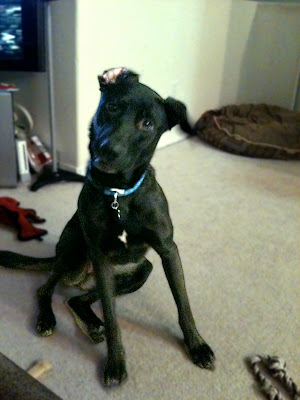
the image quality of this picture was poor to begin with, since it came from my phone. but i figured i'd give it a go anyway.

here's the original:

and here's the photoshopped version:

mia is pretty grainy and i'm not thrilled about that, but at least now you can see her face. keep in mind i only just got through my 3rd photoshop lesson. what i learned from this attempted edit: good picture quality is a must! and editing an all black dog is hard.

i'm guessing you'll be seeing a lot of photos of the dogs being adjusted in photoshop since i have about a million pictures of them :)

Tuesday, September 28, 2010

its official..

i will be starting classes in DECEMBER!!!

honestly, i'm a little scared & excited all at the same time. this program is a pretty big commitment for the next couple of years. sending in the first payment actually had my heart rate speed up...

but these classes are a step in the right direction, a start to having a solid foundation in the digital world. i'm looking forward to some new tools (hardware & software), trying something new, and taking some classes (which i haven't done in 6 years).

i'm excited at the prospects & opportunities this will bring me down the road. now i just have to stay focused on the tasks at hand...the upcoming art shows!

Friday, September 24, 2010

classes

for quite some time (years actually), i've been looking into taking some online graphic design courses. i've dabbled with photoshop & illustrator over the years and realized that i needed a foundation with these programs (plus others) in the world of digital art.

my college training was focused on traditional methods of work (meaning no computers allowed) and the head of the art department at the time did not embrace the idea of learning digital methods of creating art. this left me with a pretty big handicap when it came to working & manipulating my images on my (old) laptop...

letterpress printing has gone from traditional hand set lead type to photopolymer plates...and, with that, the possibilites for letterpress printing have expanded to a whole new exciting level! and because photopolymer plates are the direction i want to go with my printing...i've decided to do something about it and take some classes.

i won't plan to start until december, but i'm getting signed up pretty soon. with this new adventure, i'll also be purchasing a macbook pro (YES!!!) and adobe software (YEA for student discounts!!) i'm just waiting on some answers to a few last minute questions before i sign up...wish me luck :)

Friday, April 2, 2010

website update!

i finally got around to updating the Tama Press website! i had oodles of pictures that i'm still working through - a lot of work cropping and adjusting some lighting in photoshop. i would love to learn to take pictures that need NO EDITING WHATSOEVER. that would be rad.

there are lots of new books - all different kinds - japanese stab, secret belgian, address, blanket stitch, and more! in addition, i also posted pics of some small boxes i made here. they have a lid that flips open with partitions on the inside for your treasures.


the traditional photo album section is up here. these were matching sets of an album & box i made for shows.


please visit the website and look for the little "new!" signs under the photos.

Thursday, October 22, 2009

logo

since i've started learning how build my website, i've thought "gee i need a logo." well, now that i'm learning to use this online program harvest (for time keeping & invoicing - i'm really happy with it so far), the logo issue has popped up again.

after a few tries, i made something simple, but i like it. and since i don't have much experience doing anything besides cropping & slightly adjusting photos in photoshop, i figured it would be good to stick to something simple. so here it is:
the symbols in the box are japanese hiragana - meaning "tama". tama was my great-grandma's name. i'm working on putting it on my website and will get everything uploaded with the new logo soon.

and i'm hoping after the shows in november, i'll be able to buy the boxcar press base and try out ordering my new logo as a letterpress plate. and then i will proceed to print it on everything.

Friday, June 12, 2009

website sneakpeek!

i have been working away on the new website for my business tama press. i'm learning a lot about dreamweaver (and have been swearing at it fairly often too) and photoshop (more swearing). i'm almost done with the homepage and will start working on the other pages soon. here is a pic of the new homepage:


let me know what you think!

Thursday, June 11, 2009

website work

so during the past week or so, i've been working on the tama press website. i haven't actually changed anything on the site as of yet, but i am creating the new pieces and parts in photoshop and dreamweaver. i've been drawing things out by hand to get a better idea of what i want rather than trying to create them in the program itself. working (fumbling) with photoshop isn't too bad with my extremely basic knowledge of the program (and help book on standby). dreamweaver and i aren't on friendly terms right now. things basically go like this: i open the program, try to make something, get pissed off, and go do something else....in the span of 5 minutes. hence the reason i've sketching out the design format by hand...then all i have to do is replicate it, rather than design & execute at the same time.

this site is where i've gleaning some inspiration for my new site: hello lucky